














A gringo’s survival guide to Wassup
There is a widely ignored truth about Ecuador, and it is not written into law or printed on any government website. This country does not run on procedures, institutions, or government stamps; it runs on WhatsApp. If you want food delivered, a taxi summoned, a plumber persuaded to appear, a dog groomer booked, or a handyman to come and stare at your washing machine for twenty minutes before announcing “es la bomba,” WhatsApp is where reality happens.
 The trouble is that WhatsApp in Ecuador is not the same WhatsApp that exists in North America. Over there it is a polite little messaging app, mostly used to avoid international calling fees or to receive blurry photos of somebody’s cousin’s dog; over here it has evolved into something closer to an operating system with its own customs, shortcuts, expectations, and survival strategies, and I have started to suspect that the next big business opportunity is not teaching WhatsApp to newbie gringos at all, but teaching WhatsApp to the AI bots trained in North America, because no bot is ready for the message your domestic helper sends at 9:14 a.m. while you are still drinking coffee.
The message will include this: “Don Charlie no se olvide Deja y TIPS y golosinas.” A North American bot will confidently translate it as: “Please do not forget déjà vu, helpful tips, and golosinas,” but in real life in Ecuador, Deja is a detergent brand name, but widely used as a name for laundry detergent in general; TIPS is another brand label that covers various household hygiene products, which means you can never be entirely sure whether it refers to toilet blue blocks or something else; golosinas simply means any kind of candy.
So this is not really an article about WhatsApp; it is an article about functioning in Ecuador with a smartphone in your hand and very likely incomplete Spanish in your head. Here are six WhatsApp skills that will move you from confused foreigner to competent local, and if you learn them early, preferably on day one, you will save yourself a great deal of frustration with delivery drivers who are here, there, and everywhere, except that you cannot find them and vice versa.
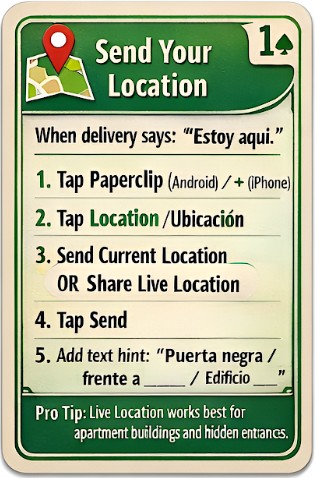 1) Send your location, before the delivery guy gives up and changes careers
Sooner or later you will receive the text message: “Estoy aquí.” It means, “I am somewhere in what I believe is your general area, and now we begin the traditional Ecuadorian phase of geolocation and despair.” If you reply with “OK” or “Where?” you have already lost, because you are assuming he is operating with your map and your concept of addresses, which he is not.
Instead, open the chat, tap the paperclip on Android or the + symbol on iPhone, choose Location (Ubicación), then send your current location; even better, share live location if your building entrance is not where GPS thinks it is. Then add one identifying detail in text, such as “puerta negra,” “frente a la farmacia,” or “Edificio Larga, portón grande,” because location alone is often not enough in the real world, and the real world is where your food is currently getting colder by the minute.
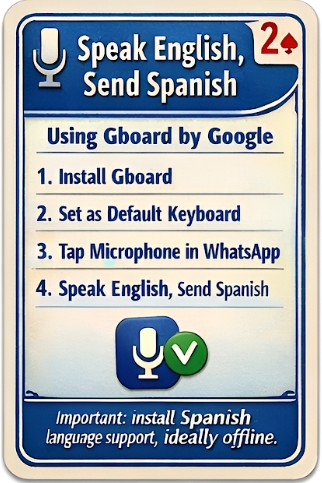 2) Speak English, send Spanish, using Gboard (the gringo cheat code)
Most gringos start by doing this the hard way, dictating in English, copying into a translation app, pasting Spanish back into WhatsApp, then hoping they have not accidentally asked the taxi driver to bring a goat. There is an easier way: install Gboard by Google.
Gboard is a keyboard app that gives you microphone dictation built into the keyboard, and it can support a translation workflow so you can speak English and see your message in English with the Spanish in another box above it. Install Gboard, set it as your default keyboard, then in WhatsApp tap the message field and use the microphone to dictate; for best results, make sure that Google’s (or Apple’s) Spanish language support is installed on your phone, ideally for offline use, because sometimes you might want to use it in the Cajas or during a power outage.
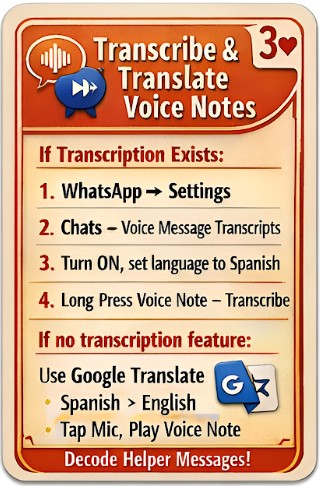 3) Transcribe and translate voice notes, because Ecuador runs on audio messages
Latin American WhatsApp culture runs largely on dictated voice notes. Entire family dramas and business arrangements are conducted through 47-second audio messages recorded on buses, complete with honking and traffic sound effects, and the Spanish is often fast enough to leave you staring at your phone as though it has personally betrayed you.
WhatsApp has been rolling out voice message transcription in some versions. If you have it, go to WhatsApp Settings, then Chats, look for Voice Message Transcripts (Transcripciones), enable it, and set the language to Spanish; after that you can long-press a voice note, choose Transcribe, and WhatsApp will show the text under the audio so you can copy and translate it. If you do not see this feature, do not assume you are stupid; assume WhatsApp has not decided you deserve it yet. Or maybe you just need to download an updated version of WhatsApp.
The universal method is Google Translate: set it to Spanish → English, tap the microphone, then play the voice message near your phone. It will not be perfect, but it will be good enough to turn Deja, TIPS, and golosinas into an actual shopping list.
 4) Install Google Translate “on top of WhatsApp,” so you can translate without gymnastics
One of the best upgrades you can make is to enable translation without leaving WhatsApp. On Android, Google Translate has a feature called Tap to Translate, which lets you translate copied text while still inside the app.
Install Google Translate, enable Tap to Translate in settings, and allow it to display over other apps. After that, when you copy a message inside WhatsApp, a little translate bubble appears; tap it and you get an instant translation. This is especially useful when someone sends you a long message about gas delivery, water shut-offs, building meetings, missing dogs, or invitations you cannot dodge without a small performance involving a fake fever.
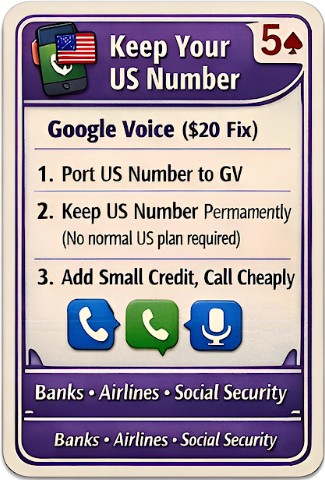 5) Preserve your US number using Google Voice, the $20 life insurance policy
If you are moving to Ecuador, there is one WhatsApp mistake that causes long-term irritation: changing your number and losing your US identity. The best solution, if you can do it, is Google Voice.
You can port your US number to Google Voice for a one-time fee of about $20 (assuming eligibility), and then keep that number alive indefinitely without maintaining a standard US plan. This means that if you lose US cellular service to this number, no one else can ever use your old number for Whatsapp, because it is parked at Google Voice forever.
You can also add a small amount of money to your Google Voice balance and use it for overseas calling at extremely low rates, cheap enough to call Social Security and sit on hold for 90 minutes without feeling you are burning through your retirement one minute at a time.
 6) Put WhatsApp on your laptop or desktop, because thumb-typing is not a retirement plan
Sooner or later every gringo in Cuenca discovers the same inconvenient truth: WhatsApp is not just an app on your phone; it is your entire administrative life. It contains your taxi contacts, your delivery arrangements, your plumber’s excuses, your building manager’s announcements, and a disturbing number of photos of leaking pipes that you took for evidence, like a crime-scene investigator who specialises in domestic plumbing.
This becomes a problem when your whole life is on a screen the size of a Tarot card.
The solution is to install WhatsApp on your laptop or desktop, because the moment you do it you stop living like a frantic teenager and start living like a functional adult. You get a full-sized keyboard, you can attach documents from your hard drive without performing a dance of downloads and re-uploads, and you can actually manage long messages properly, instead of pecking at the screen and accidentally sending a taxi emoji halfway through a sentence.
There are two versions: WhatsApp Web and the WhatsApp Desktop app. WhatsApp Web is the simplest, because you can use it on any computer without installing anything; open Chrome (or any browser), go to web.whatsapp.com, and you will see a QR code. Now take your phone, open WhatsApp, tap the menu (the three dots), choose Linked Devices, tap Link a Device, and scan the QR code. That is it. Your WhatsApp instantly appears on the computer screen, and your fingers will feel as though they have been released from a small prison.
The advantages pile up quickly. You can write longer messages in Spanish with fewer errors; you can copy and paste addresses, bank numbers, passport details, tracking codes, or anything else that modern life demands; you can download documents into proper folders instead of losing them in the swamp of your phone gallery; you can also upload PDFs, photos, and scanned documents directly from your hard drive, which is useful because Ecuadorian life produces paperwork the way humid weather produces mould.
This is incredibly useful if you are traveling overseas, because you can start a thread to which you upload all your airline, hotel, and car reservations and associated emails in the correct order in a Whatsapp chat and easily find them when you need to show them to someone without thumbing through stacks of folded papers
It is also helpful for translation, because WhatsApp Web in Chrome turns your computer into a bilingual workbench. You can keep WhatsApp open in one tab and a translator in another, or you can right-click and use Chrome’s translation features when you are dealing with a long message that looks as though it was written in a hurry by someone walking uphill. On a phone, this kind of work feels like punishment; on a laptop, it feels like administration, which is exactly what it is.
And here is the feature that really does seem almost magical: if you are sitting in Parque Calderón and you dictate a note into WhatsApp on your phone, then send it to yourself in WhatsApp, it will be immediately available on your laptop or desktop as well. This is not just convenient, it is a real quality-of-life upgrade, because it turns WhatsApp into a bridge between your mobile life and your home office. A street thought becomes a desktop document, a dictated reminder becomes a typed checklist, a quick idea becomes a finished message, and you did not have to email yourself anything, which is good because email in Ecuador is mostly a museum piece.
Finally, there is the simple fact that if your phone is misplaced somewhere in the apartment, WhatsApp on your desktop gives you a fighting chance of solving the problem without getting out of your chair, because you can message or call your own device, and you can keep communicating while you search sofa cushions for a trapped phone like rescuing a dog from a rabbit hole. The gringo who uses WhatsApp on a computer is not merely more efficient; he or she is calmer, more organised, and less likely to lose their sanity when somebody writes “estoy aquí” from an unknown street corner.
The irony is that WhatsApp itself is not complicated; the reality WhatsApp has evolved to manage in Latin America is complicated. WhatsApp here is infrastructure, and the gringo who masters it becomes, almost by accident, a Cuenca-literate Gringo. Better still, he or she becomes the person other gringos ask for help, and that is the moment you know you have settled in properly, because nothing says “I live here now” like explaining to another foreigner how to send a location pin to a delivery driver who is definitely round here somewhere and yet still, in some metaphysical sense, lost beyond Pluto.