














Downloading videos and music made simple
In Cuenca, most expats have figured out one way or another of watching English-language TV or videos, usually via fiber optic cable and a reasonably reliable internet connection. One quickly discovers, however, that the modern world rests on a fragile assumption: that wherever one travels, decent Wi-Fi, unrestricted streaming, and sufficient bandwidth will be available as desired.
This assumption holds until the moment one is sitting in an airport lounge, a budget hotel, or an Airbnb where the internet resembles two damp strings connected to a potato, or midair over Jamaica on an economy flight with no built-in entertainment, or hosting non-technical guests from overseas who need to be kept occupied on the spare TV in the guest room. At which point one begins to understand, with a clarity that streaming evangelists rarely acknowledge, the enduring appeal of a personal media library stored on a hard drive somewhere on the home network.
 The practical attraction is obvious enough. A downloaded movie, documentary, jazz concert, language lesson, or instructional video can be played on a laptop, desktop, phone, or television without commercials, buffering, subscription logins, regional restrictions, or the particular misery of an internet outage mid-climax.
For travelers, expatriates, and anyone who has ever attempted to watch a BBC documentary from a hotel room in Panama while the television offers only dubbed game shows, local soap operas, and something involving giant insects, this can feel less like piracy and more like a sensible precaution.
Enter yt-dlp
For the uninitiated, yt-dlp is an open-source command-line program designed to retrieve publicly accessible video and audio from an enormous range of websites.
It is maintained by volunteer developers and has become a widely used technical tool for media downloading, format conversion, subtitle extraction, and metadata preservation. Like most tools, its legality depends less on the hammer than on what one chooses to hit with it. Using yt-dlp to download public domain lectures, Creative Commons media, or legally permitted content is generally lawful. Using it to circumvent subscription protections or redistribute protected material may violate platform terms of service and local copyright law. A kitchen knife remains legal too, though society takes a dim view of certain applications.
For most ordinary users, however, yt-dlp is almost impossible to use, because it requires command-line syntax and nameless squiggly keyboard symbols that can appear impenetrable to those more accustomed to clicking buttons than composing and typing strings of code. Installing it, locating browser cookies, selecting formats, and properly invoking a secondary program called ffmpeg can feel like being asked to rebuild a diesel engine merely to hear Benny Goodman on an interprovincial bus.
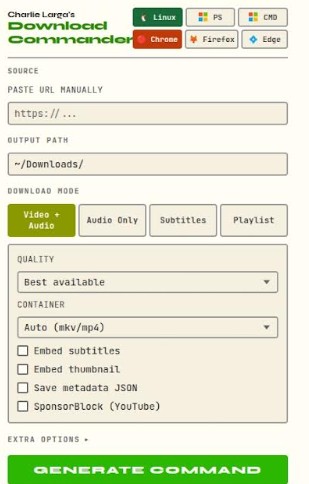
This is where the entirely free Charlie Larga’s Download Commander browser extension enters the picture.
Rather than downloading anything itself, the extension functions as a command generator. It allows users to select settings through a graphical interface and then produces a ready-made command line for the Linux GRUB command line, Microsoft PowerShell, or Windows Command Prompt, which can easily be copied and pasted into the appropriate terminal. In plain terms, it is a translation device between normal human preferences and command-line gobbledygook.
One feature deserves particular mention, because it solves a problem that defeats most experienced yt-dlp users.
When a YouTube channel contains a playlist of eighty or a hundred or more videos, most people assume they face a binary choice: download all of them, or download each one individually. Neither option is appealing or ergonomic, but the Download Commander offers a third way. Switching to playlist mode and selecting “Pick specific items” allows the user to type a selection such as 5-10, 13, 17, 21, 25-30, 45, and the program constructs the correct command to download precisely those items and nothing else.
For researchers, language learners, or anyone building a curated offline library from a long archive, this is the kind of capability that sounds straightforward but is, in practice, almost impossible to find pre-packaged in any free tool aimed at ordinary users of the Internet.
The Charlie Larga browser extension works with Google Chrome, Firefox, and Edge on both Windows and Linux.
The user just selects the operating system and browser with a couple of mouse clicks, names an output folder, picks video or audio quality and format, selects subtitle language and thumbnail options if required, and the program assembles the correct syntax accordingly.
It performs no downloading, hosts no copyrighted files, and contains nothing more clandestine than a menu. It merely generates instructions that you can copy and paste into a command window, much as a GPS provides driving directions without actually steering the car.