













Google, we never knew you
The other day I stumbled into one of those discoveries that makes you wonder how many useful things have been sitting under your nose for years. We’ve all had that experience. You buy a car and six months later someone casually mentions that the mirrors fold in automatically. You own a microwave for five years before discovering it has a toaster timer. Modern software is worse still, layering menu upon menu and shortcut upon shortcut until most of us never find our way past the first level.
Google Search, it turns out, is much the same.
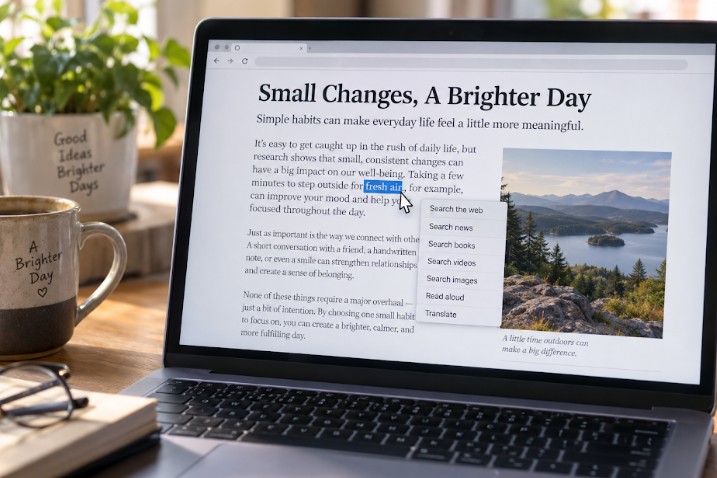 Most of us assume there is only one Google. We type a question into the box, press Enter and accept whatever appears, whether that’s news stories, shopping links, YouTube videos or, more recently, an AI summary standing between us and the websites we were actually looking for. What I hadn’t realized, until I went digging, is that Google has been hiding a surprising number of different search modes behind the scenes all along.
With one small change to the web address, the search engine can produce an entirely different style of results. One version sticks to ordinary web pages, while another favors books. Others specialize in news, videos, forums, products or images, and a few experimental modes appear to exist purely for Google’s internal purposes rather than for anyone using the site. Almost nobody sees any of this, which strikes me as rather odd, a bit like buying a television with thirty channels only to find that the remote shows you five of them. The other twenty-five are still there, only nobody has bothered to tell you how to reach them.
It reminded me of something I saw often during my years in healthcare. Hospitals are full of expensive equipment capable of dozens of functions, yet many nurses and doctors only ever use the handful they learned during their first week of orientation. Nobody has time to read a four-hundred-page EKG machine manual on the off-chance that one obscure feature might prove useful during an earthquake.
Computers, I think, have reached the same stage: astonishingly powerful, and stuffed with functions that remain hidden behind commands that sound like they belong in an engineering manual.
As I read further, I found online discussions where the more technically minded had already turned these hidden search modes into browser shortcuts, keyboard aliases and custom search engines. Some had built entire browser extensions just to switch between them. That, I think, is exactly the wrong solution. Whenever computer enthusiasts discover something useful, their instinct is to build an even more complicated way of reaching it. The rest of us don’t want mysterious codes or keyboard shortcuts to memorize. We want a menu, and we want it to be obvious.
So imagine this instead. You highlight a phrase on any web page, right-click, and a simple list appears: search the web, search news, search forums, search books, search videos, search shopping, search images, search Reddit discussions, or search without the AI summary getting in the way first, or even search shopping, but only in Ecuador. One click, no secret codes, no technical knowledge required. You simply tell the computer what kind of answer you’re after.
The more I thought about it, the more obvious the whole idea seemed. Searching for a vacation package is a different task from researching a medical condition. Looking for an instruction manual has little in common with checking today’s headlines, and hunting for a bargain is nothing like settling an argument with a friend. Why should one search fit every purpose?
It occurred to me that the idea needn’t stop with Google, either. The same menu could just as easily send a search to Wikipedia, YouTube, Reddit, Brave Search, Amazon or almost any specialized site you care to name, letting you choose the destination rather than learn a dozen separate tricks to get there. Perhaps that’s the direction software ought to be heading. Artificial intelligence grows cleverer by the month, writing essays, generating pictures and translating languages in seconds, and yet millions of otherwise capable people still can’t find the settings menu on their own phones. Maybe the next real advance won’t come from making computers smarter, but from making them easier to understand.
Anyway, I eventually got around to building that browser extension myself, right-clicks and all. You can download it HERE and install it into most common browsers by following the instructions in the included read.me file. Or if you want something even simpler, just bookmark this Web site to blow away all the AI search results.



Hogar Esperanza News

Property Manabi

Fund Grace News

Fabianos Pizzeria News

The Cuenca Dispatch

Week of September 06

U.S. sinkings of Ecuadorian fishing vessels trigger court scrutiny after 28 crew members are released.

Cuenca targets a November launch for its first new international link to Chiclayo.

Exports hit a quarterly record, but Ecuador’s import bill is rising even faster.